Logging Apple Pay Purchases As YNAB Transactions
Problem
Recently, I discovered that the iOS Shortcuts app provides an automation where tapping Apple Pay Wallet cards executes some pre-defined actions. As an avid user of both Apple Pay and You Need A Budget, I started to wonder whether I could automate the creation of YNAB transactions as purchases occur.
Unfortunately, the built-in “Add New Transaction” Shortcuts action that comes with the YNAB app does not let you add transactions in the background. Instead, it opens the app and simply pre-fills the fields of the Add Transaction screen.
Solution
A more seamless, albeit more complicated, solution involves using the “Get Contents of URL” action to send purchase details to a web service that calls the YNAB API to create the transaction.
GCP’s Cloud Run Functions proved to be the perfect place to host the API service as they are serverless, can be triggered from an HTTP endpoint, and will not cost anything unless you make thousands of purchases per day!
Cloud Run Function
Cloud Run supports several languages out-of-the-box, and I picked Python because I was already familiar with the Flask framework, which Cloud Run uses in its Python runtime. Moreover, YNAB developers have an official Python client, which makes working with their API much easier.
The entrypoint of the function looks roughly like this:
# See YNAB Python Client docs
api_client = ynab.ApiClient(...)
BUDGET_ID = 12345

@functions_framework.http
def process_request(request: flask.Request) -> flask.Response:

    # Get purchase data sent from the Shortcuts automation
    data = request.get_json()

    # Convert the POST data into the format expected by YNAB's API
    transaction = parse_transaction(data)

    # Create transaction using
    api_instance = ynab.TransactionsApi(api_client)
    api_instance.create_transaction(BUDGET_ID, ynab.PostTransactionsWrapper(transaction=transaction))

    resp = make_response("Transaction Posted", 200)
    return resp
Full source code can be seen here: https://github.com/tg2648/create-ynab-transaction
The data sent by the Shortcuts automation looks as follows:
{
    "amount":"$6.22",
    "name":"Whole Foods",
    "card":"Chase",
    "merchant":"Whole Foods",
    "date":"2025-08-09T21:26:45-04:00"
}
The parse_transaction helper function does a lot of heavy lifting to turn this into a YNAB transaction:
- Amount needs to be converted into YNAB’s “milliunits” format (e.g. $123.93 = 123930)
- Date needs to be in the
YYYY-MM-DDformat - Card name needs to be converted into account ID
- YNAB also expects a category ID (e.g. Groceries), which most of the time can be inferred from the merchant’s name
Unfortunately, account and category IDs are specific to each person’s budget and there need to be lookup tables.
Looking up category IDs can be omitted because YNAB intelligently assigns a category if a previously-used payee is used.
Dealing with Secrets
Since it is a bad idea to store access tokens in source code, and I also did not want to store my account and category IDs in order to be able to share the code, I opted for using GCP’s Secret Manager.
It allows me to save YNAB-specific data as JSON, which I can then load from the application (see the get_secret function in the full source code):
{
    "access_token": "123",
    "budget_id": "456",
    "accounts": [
        {
            "name": "Chase",
            "id": "d7d0656a-2024-4et1-bef7-e150d8re2bf1"
        }
    ],
    "merchants": [
        {
            "name": "Whole Food",
            "category_id": "c8720tc7-9b50-48a1-aa74-733b543562ed"
        }
    ]
}
Shortcuts Automation
The last step is to tie everything together in a Shortcuts Automation:
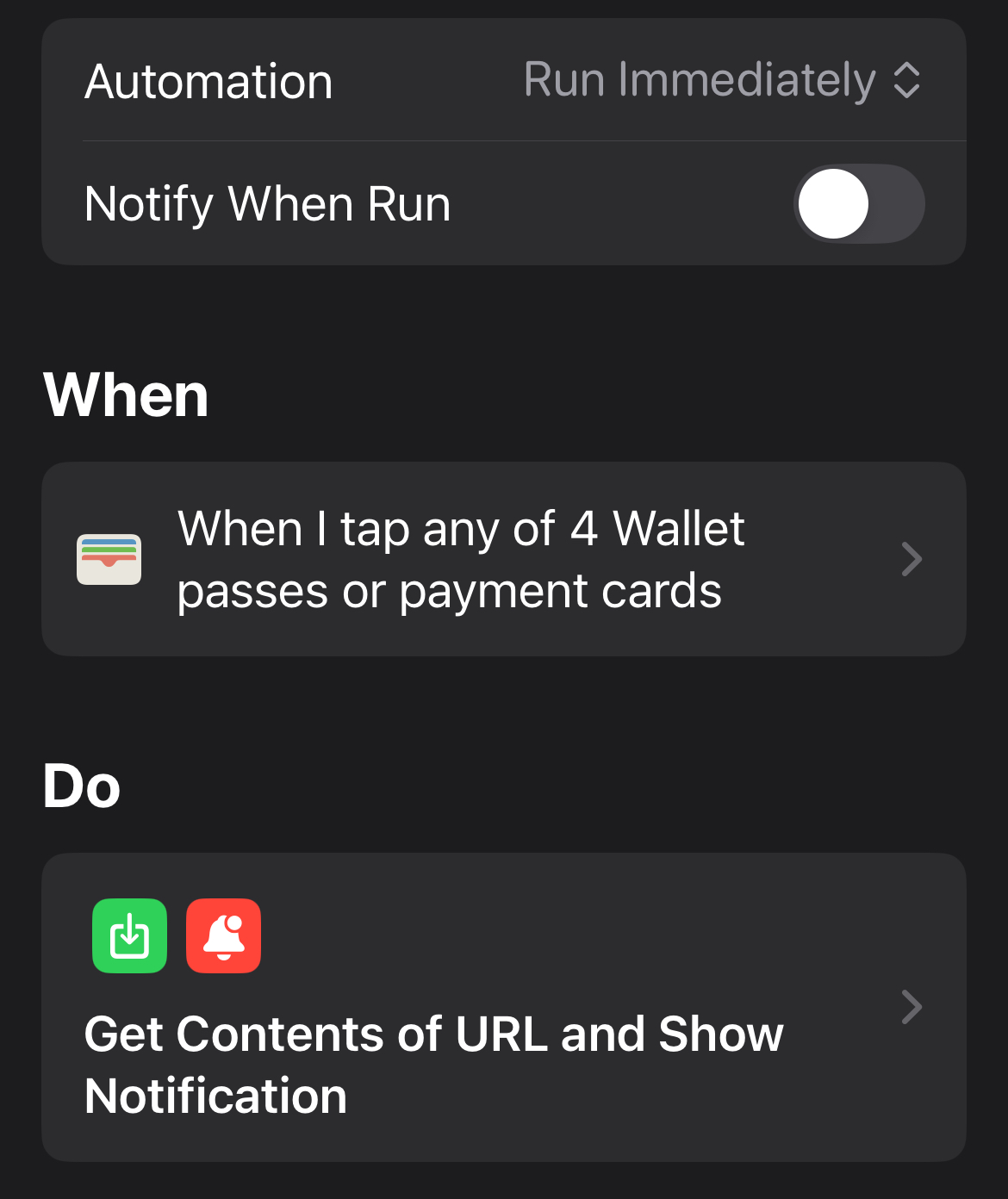
Details of “Do”:
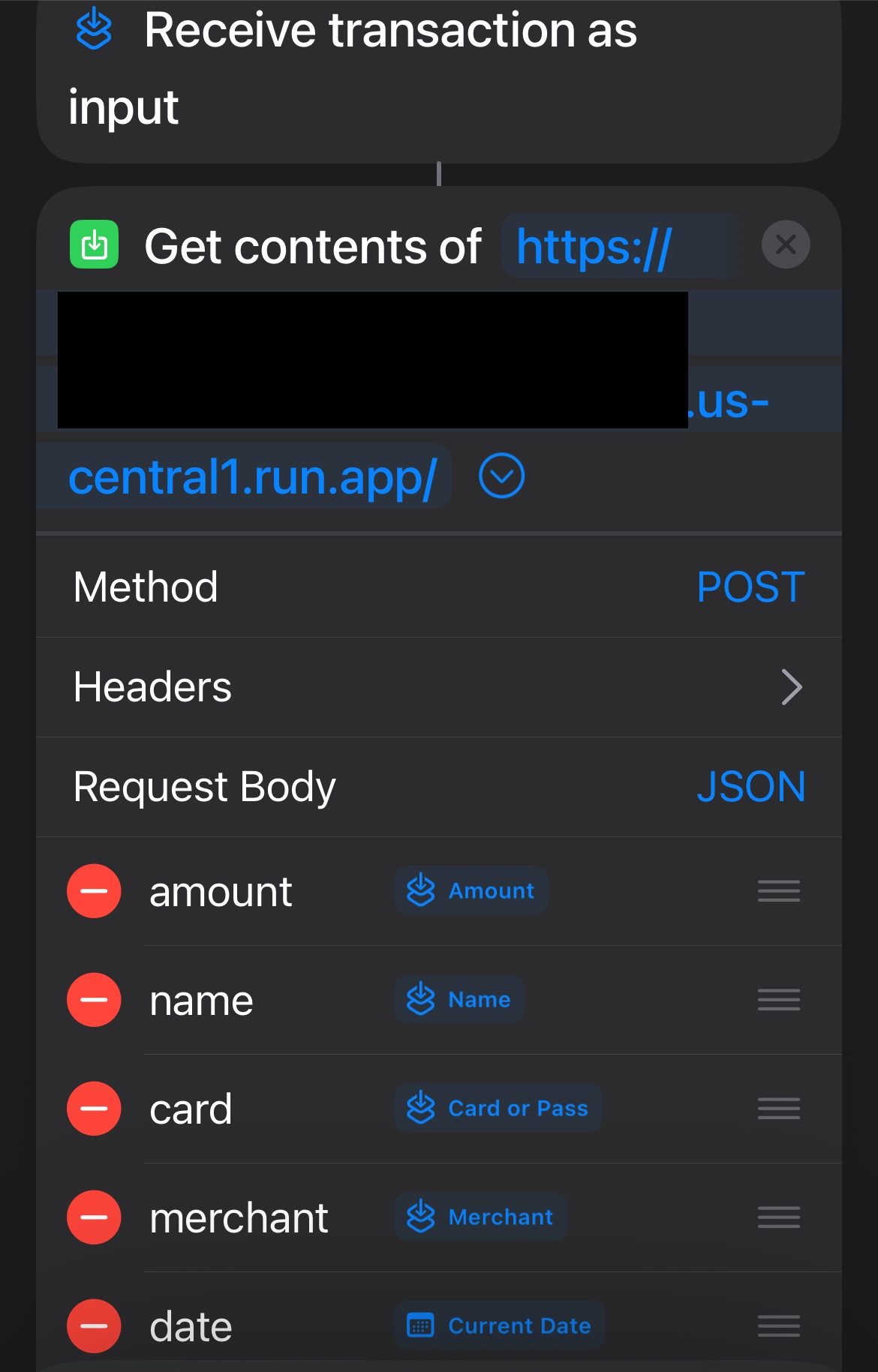
Where the URL is the URL of Cloud Function’s HTTP endpoint.
Caveats
There are a few things to keep in mind with this approach.
- Any transaction not in your budget’s currency will not work. I need to temporarily turn off the automation when I’m abroad.
- Sometimes the purchase amount is not available right away, in which case the Cloud Function returns an error. This happens to me when using Apple Pay on some mass transit systems.
- Obviously, split transactions are much more complicated and will not work with this setup.